
 JapanJA
 ThailandEN
 VietnamEN
 LaosJA
 CambodiaEN
 MyanmarEN
 IndonesiaEN
 PhilippinesEN
 SingaporeEN
 MalaysiaEN
 IndiaEN
 BangladeshEN
 Sri LankaJA
 ChinaJA
 Hong KongEN
 MongoliaJA
 RussiaJA
 TürkiyeEN
 MoroccoJA
 KenyaJA
 South AfricaJA
 NigeriaJA
 MexicoEN
 BrazilJA
 PeruJA
 ColombiaJA
AIBOU
Measure real PC work to find waste and build manuals
PC work measurement and AI diagnosis tool by SCAD (Tokyo Consulting Group) that uncovers hidden waste, drafts workflows and manuals, and verifies time savings.
Inside AIBOU
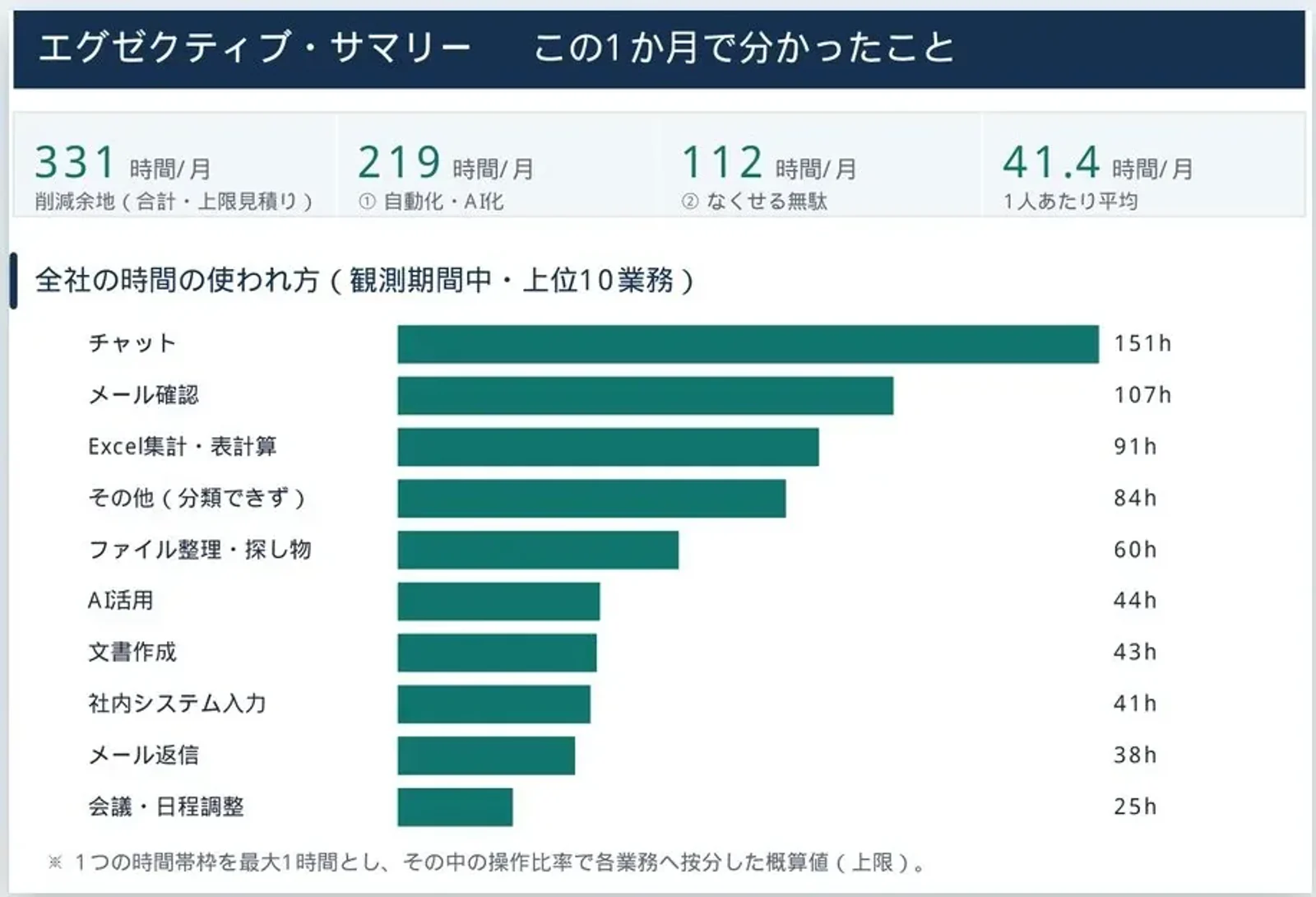
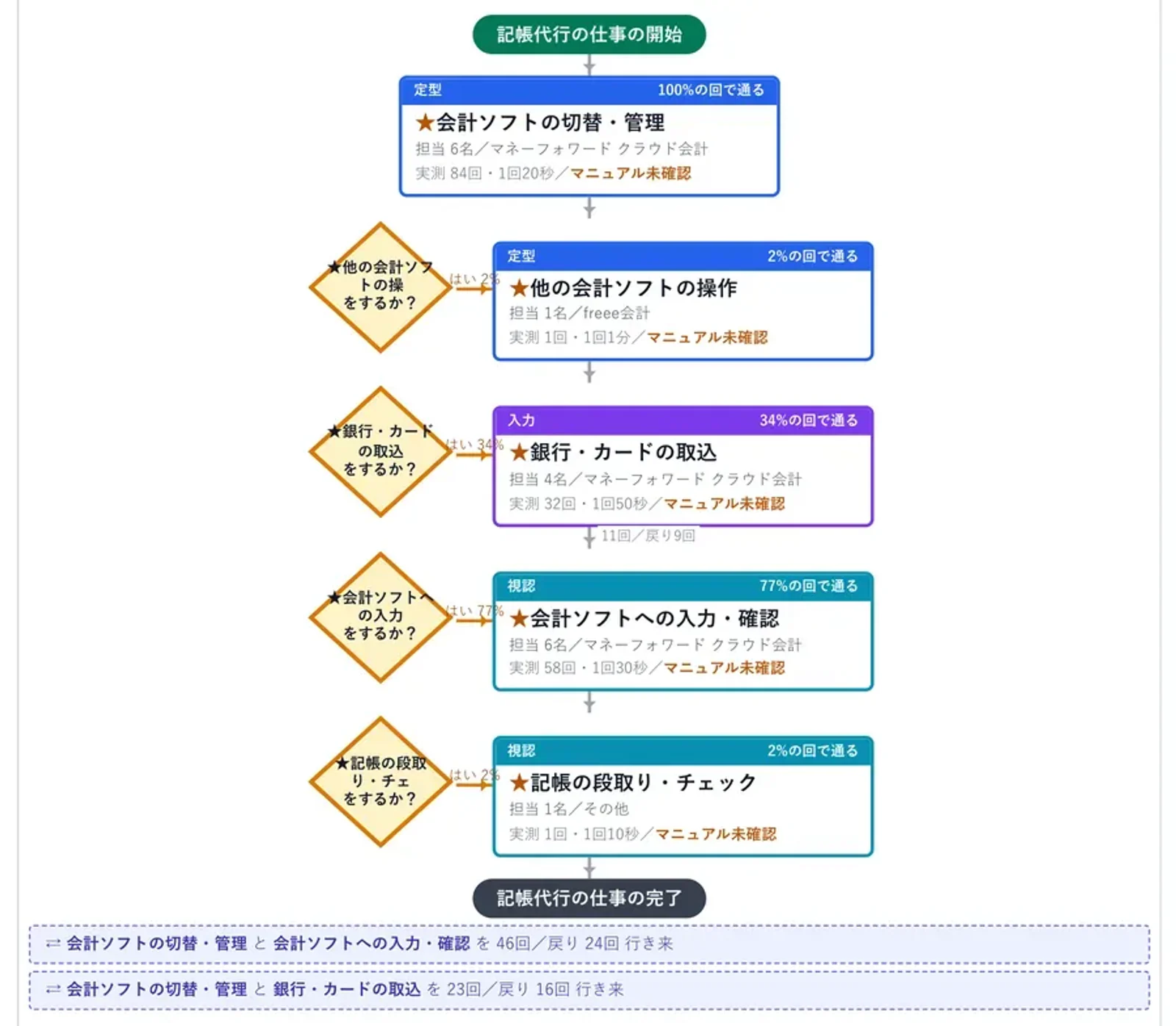
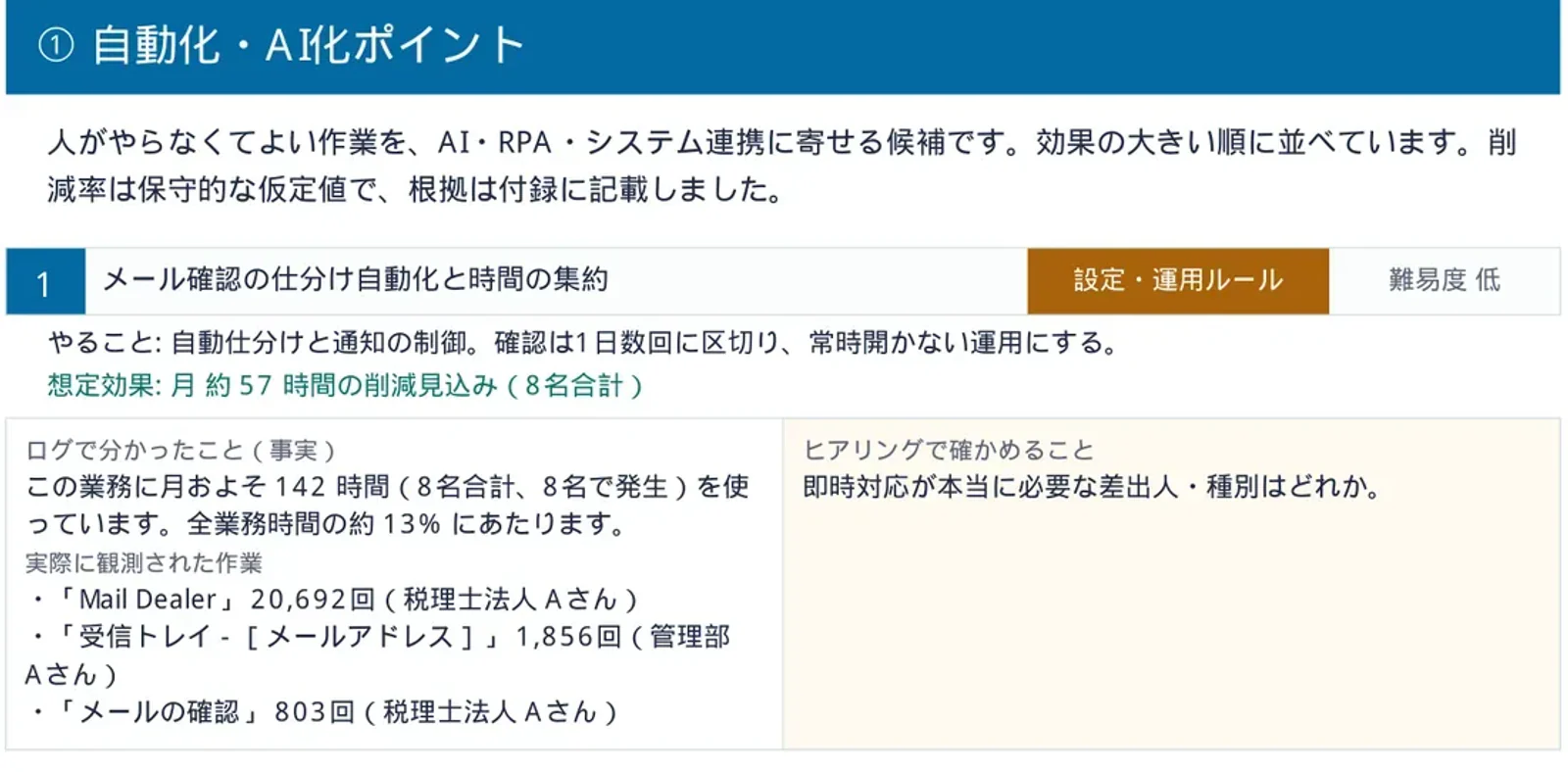
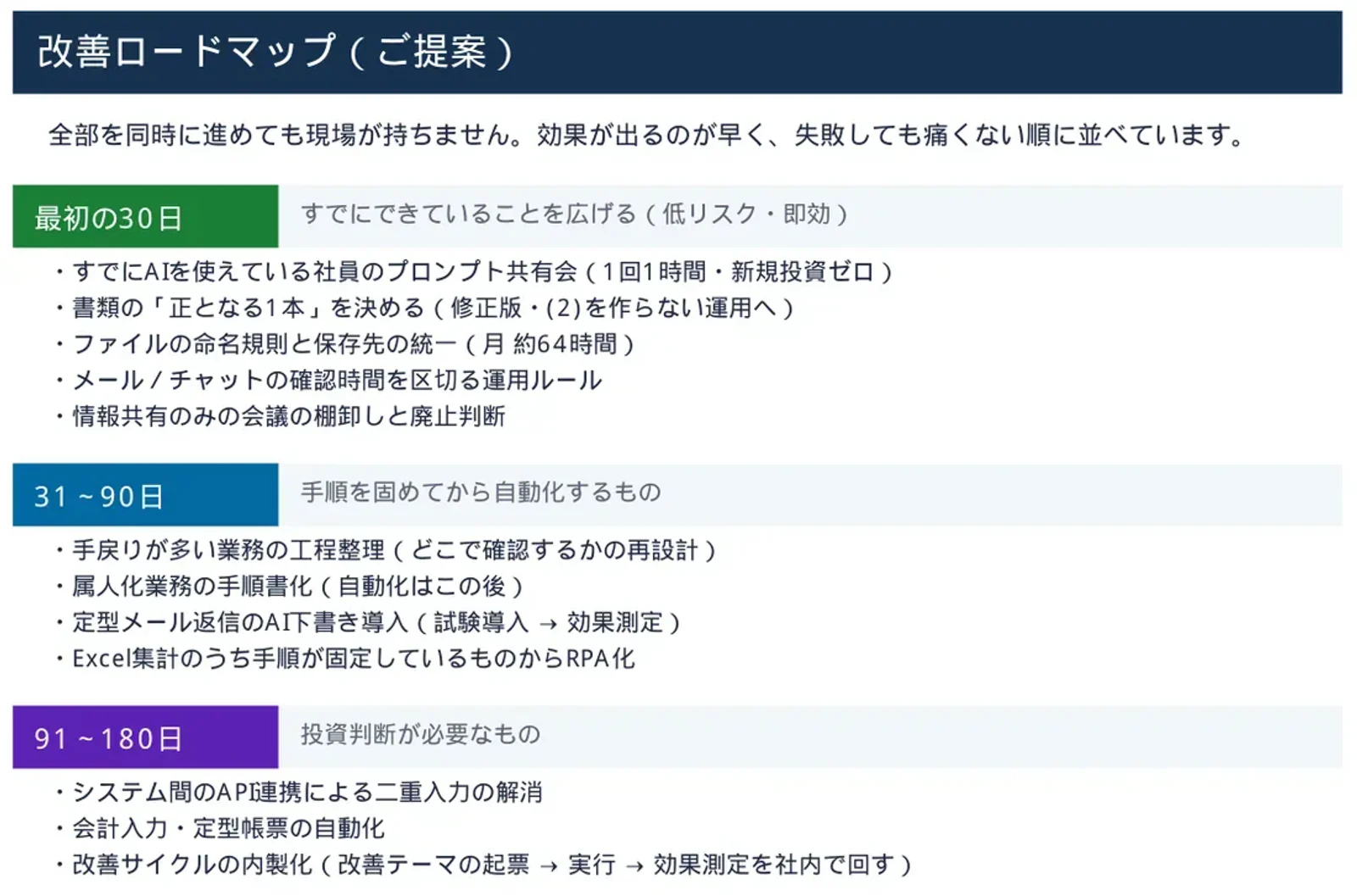
AIBOU is a work-visibility and AI process-improvement platform from SCAD Inc. (Tokyo Consulting Group). While factory floors are carefully measured, office work is rarely measured accurately: surveys and timesheets take effort and rely on memory, leaving leaders to guess where automation or AI will actually help.
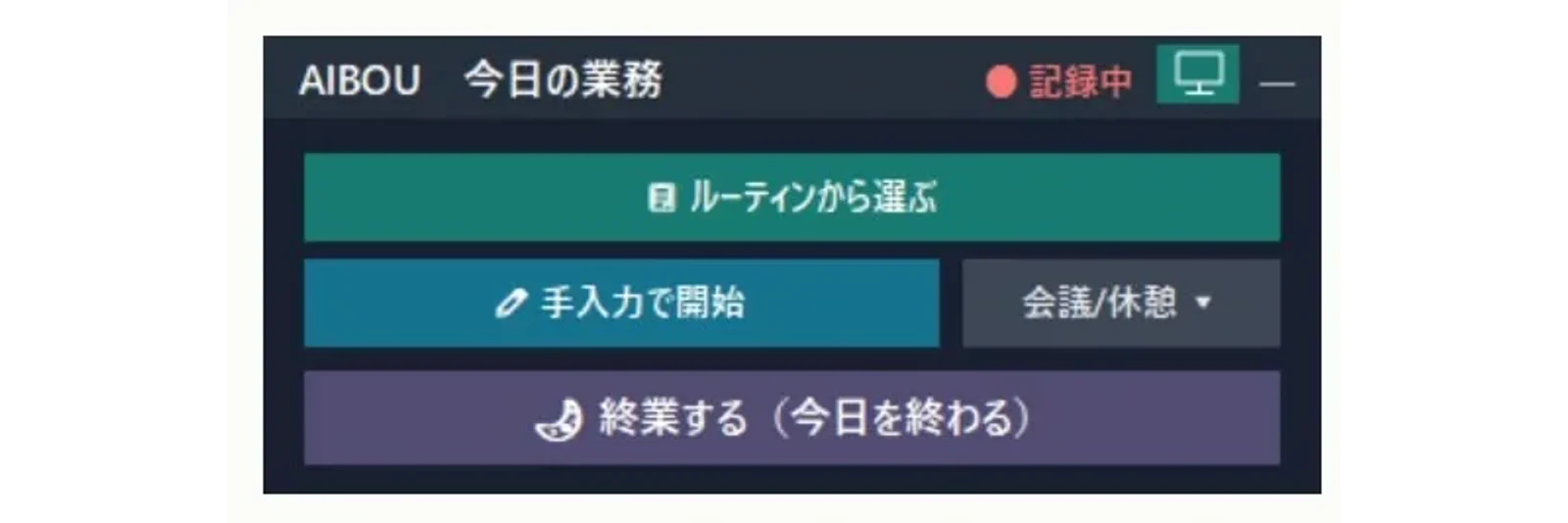
AIBOU measures real PC activity without daily reports or manual timesheets. Using a lightweight desktop window, employees start their workday, pick routine tasks, log meetings or breaks, and end their day. From those records, AIBOU builds a work diagnosis report showing where hours actually go, which repetitive steps can be eliminated or handed to AI, and a phased improvement roadmap.
Privacy by design is built into AIBOU so measurement stays a tool for improving work rather than policing staff. It records only app names, window titles, timestamps, and activity presence; typed text, email and chat bodies, passwords, and off-hours activity are never recorded. Screen capture is off by default, four-tier viewing rights apply, and every view by someone other than the employee is logged for two years.
On paid plans, AIBOU also drafts workflows and image-backed manuals from real screen operations, syncs drafts into Vistruction in minutes, and automatically compares the 28 days before and after an improvement at day 14 and day 28. According to SCAD's October 2026 track record document, AIBOU is used by more than 50 companies across Japan and eight other countries (company names confidential; sizes approximate), and Tokyo Consulting Group runs it internally across 383 staff.
Key features
Zero-timesheet PC work measurement
Measures exact hours spent per task from PC activity without daily reports or surveys, requiring about three minutes per person to launch.
Executive work diagnosis report
Breaks down company-wide PC time across top task categories and separates eliminable waste from automation and AI candidates with an implementation roadmap.
Automatic workflow and manual drafting
Builds editable workflow diagrams directly from observed work logs and generates image-backed procedure drafts by performing a task once on screen (paid plan, company opt-in).
Automated AI interview question generation
Identifies undocumented steps, branching decisions, and frequent back-and-forth rework loops, automatically preparing targeted questions for frontline confirmation.
Automatic 14-day and 28-day effect check
Verifies whether improvements truly reduced work hours by comparing the 28 days before and after adoption at 14 and 28 days without relying on self-reports (paid plan).
Privacy-by-design activity boundaries
Records only app names, window titles, timestamps, and activity presence while excluding keystrokes, email and chat bodies, passwords, and after-hours activity; screen capture is off by default.
Role-tailored views with view audit logs
Returns records to employees first on My Page, gives managers progress and overrun alerts, provides executives task-level analytics, enforces four access levels, and logs non-self views for two years.
Five-minute Vistruction integration
Sends measured workflow drafts straight to Vistruction so frontline teams can publish official manuals, prioritize manual creation, and compare actual times against standard times.
Enterprise IT security controls
Runs on HTTPS (TLS 1.2/1.3) in AWS Tokyo with two-factor authentication, IP restrictions, 12-hour session timeouts, daily virus scans, 7-generation daily backups, 90-day auto-deletion of raw activity logs, and optional dedicated databases.
How teams get started
Distribute in 3 minutes per person
Each employee opens their assigned desktop package and runs it after reviewing the transparent data-collection consent screen, with no separate ID or password setup needed.
Measure normal work for 2 weeks
Teams work as usual using the compact desktop widget to start the day, select routine tasks, and mark meetings or breaks.
Generate the diagnosis report
Over one week, AIBOU analyzes the measured logs to produce an executive work diagnosis report, workflow drafts, and prioritized automation candidates.
Review results in a 60-minute executive session
Consultants walk leadership through the findings and candidate savings so the company decides what to adopt, revise, or skip.
Standardize and verify reductions
Continuing teams turn workflows into official manuals in Vistruction and let AIBOU verify real time reductions at 14 and 28 days.
Built for these teams
SME executives and managers deciding which office tasks to automate or hand to AI first
Back-office, accounting, administrative, and manufacturing support teams eliminating manual re-keying
DX leads, consultants, and system integrators needing factual baseline data before requirements design
Operations teams pairing measured work times with Vistruction standards
FAQs
01Does AIBOU record keystrokes, chat messages, or screen contents?
No. AIBOU records app names, window titles, timestamps, and whether activity occurred. Typed text, email and chat bodies, passwords, and activity outside working hours are not recorded, and optional screen capture is off by default.
02Is AIBOU designed for employee surveillance or HR evaluation?
No. AIBOU is designed to analyze how work flows rather than evaluate individuals. Records are returned to employees first, a consent screen discloses what is collected, and views by anyone other than the employee are logged for two years.
03What appears on an employee's computer screen?
A small floating window sits in the bottom-right corner so employees can start the workday, select a task, mark meetings or breaks, and end the workday. A background mode with no visible window is also possible with employee notice.
04What happens after the free two-week trial?
The free trial covers two weeks for up to 10 accounts and never switches to paid automatically. You apply only if you decide to continue.
05How is AIBOU priced on the paid plan?
Standard pricing on the SCAD site is $500 per month for up to 50 PCs (+$10 per additional PC per month) plus a one-time $1,000 setup fee, excluding tax. In Japan, AIBOU is also offered with Vistruction and monthly advisory support.
Other products
Ask for a demo of AIBOU.
Measure real PC work to find waste and build manuals. Talk to our Bangkok team to arrange a walkthrough or discuss adoption in Thailand.